
App overview
Bring your Pinterest boards, pins, and creative inspiration directly to your website. Connect your account, choose what to showcase, and turn your favorite collections into beautiful, interactive galleries — without coding or manual embeds.
✨ Beautiful layouts, your way
Choose between responsive Grid and Slider layouts to display your Pinterest content exactly how you want. From elegant masonry galleries to interactive carousels, every widget blends naturally with your website's design.
🎨 Make every detail yours
-
Customize image ratios, spacing, titles, and animations.
-
Fine-tune hover effects and click behavior.
-
Style each widget independently for different pages.
🔄 Fresh content, automatically
Your galleries stay up to date as you add new pins to your connected Pinterest boards. No need to manually replace images or update individual embeds.
📌 Multiple accounts, endless possibilities
Connect multiple Pinterest accounts, select different boards and sections, and create unique galleries for your portfolio, blog, business, or online store.
Everything you need to make Pinterest a natural, engaging part of your website — simple to set up, flexible to customize, and effortless to maintain.

Flexible Layout and Styling
Choose between Pinterest Grid and Slider layouts to showcase your boards and pins. Customize image ratios, spacing, animations, and navigation to create a gallery that feels right for your website.
Fine-tune titles, hover effects, and click actions to make every widget your own. Both Grid and Slider adapt to different screen sizes, keeping your Pinterest content beautiful on desktop and mobile.
How it works
Adding Pinterest boards and pins to your Wix website is simple. Connect your account, choose what to display, and customize your gallery in just a few steps — no coding or technical setup required.

1. Connect Your Pinterest Account
Securely connect your Pinterest account to access your boards and pins. Add multiple accounts to manage different collections in one place.

2. Select Your Pinterest Boards
Choose the Pinterest boards or sections you want to showcase. Display different collections in separate widgets across your website.

3. Choose Grid or Slider
Pick a responsive Grid or interactive Slider layout to display your Pinterest pins in a style that fits your website.

4. Customize Your Gallery
Adjust image ratios, spacing, titles, animations, and hover effects. Your Pinterest gallery will stay updated automatically as you add new pins.
Use Cases
Pinterest Pro Boards fits naturally into pages where visual content supports discovery, inspiration, and decision-making. Boards stay organized, update automatically, and help guide visitors through content without breaking the flow of the page.

Portfolios
Show curated projects, mood boards, or visual references in a clean, structured way that keeps focus on the work.
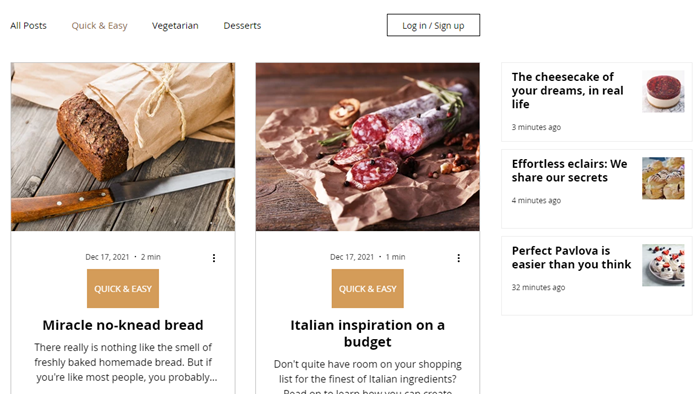
Blogs
Use inspiration boards to visually support articles while keeping reading smooth.

Stores
Present products, collections, or lifestyle inspiration in a visual format that encourages browsing and discovery.

Bookings
Support services or events with visual boards that help visitors understand offerings before taking the next step.

And More
Use Pinterest boards across landing pages, galleries, and promo sections to keep content consistent and reusable.
.png)

Ready to Add Pinterest to Your Website?
Bring your Pinterest boards and pins to your website in just a few steps. Install Pinterest Pro Boards, connect your account, and create beautiful Grid or Slider galleries that match your style — no coding required.
Start with our free plan and explore the possibilities using your own Pinterest content. Customize your galleries, keep your pins automatically updated, and create a website experience that's uniquely yours.

Powered by:
